Environment for Revit: Bridging Landscape Design, BIM, and Architecture
As Building Information Modeling (BIM) evolves, design teams increasingly want to unify building and site design in a single workflow. Coordinating site development across multiple platforms creates inefficiencies, communication gaps, and rework. Environment for Revit, developed by Arch-Intelligence, tackles this by bringing landscape and site design directly into Revit. Rather than juggling separate applications, users model, document, and coordinate outdoor environments alongside architectural elements in one familiar BIM ecosystem.

For more information, visit archintelligence.com.
Design Landscapes Directly Within Revit
Created by practicing landscape architects, Environment for Revit addresses the specific challenges of site and landscape design in a BIM environment. It offers a robust set of tools for grading, terrain modeling, planting plans, retaining walls, site documentation, and analysis — all fully integrated with Revit. Keeping site and building design in one model improves coordination, reduces workflow disruptions, and strengthens collaboration between architectural, civil, and landscape disciplines throughout the project lifecycle.
Why Architects Should Pay Attention
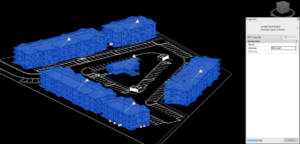
Although built with landscape architects in mind, Environment for Revit benefits architects too. Buildings rarely exist in isolation, and clients expect presentations that show how a design interacts with its surroundings. The plugin lets architects create detailed terrain, pathways, roadways, planting areas, and site features directly alongside the building model. This simplifies site modeling and clarifies the relationship between architecture and landscape. The result is greater design accuracy and a stronger foundation for visualization, documentation, and coordination.
Better Twinmotion Visualizations Begin with Better Site Models
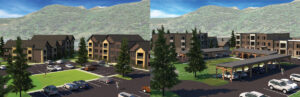
High-quality renderings depend on more than compelling architecture. The surrounding landscape often determines whether a visualization feels believable. With Environment for Revit, teams can build accurate site models before exporting to Twinmotion, Epic Games’ real-time visualization tool, which connects to Revit through the Datasmith plugin. Detailed topography, realistic planting, circulation paths, and outdoor amenities can be incorporated early in design. That site development produces more compelling visuals and helps clients understand grading relationships, the pedestrian experience, and the overall character of the project.

To learn how to link Revit to Twinmotion, see the Datasmith exporter details at twinmotion.com/plugins/revit.
My Favorite Feature: Shape by Topography
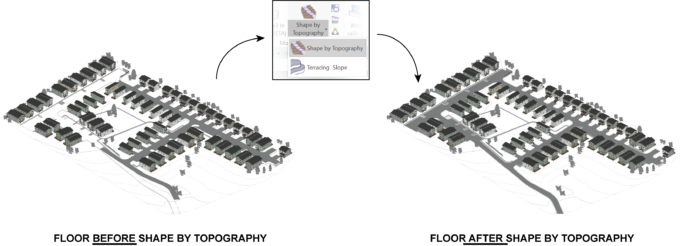
Environment for Revit offers a wide range of site design tools, but one stands out as my favorite: Shape by Topography.
Anyone who has modeled roads or sidewalks in Revit knows how time-consuming it is to make them follow changing terrain. Shape by Topography streamlines the process by letting surfaces conform directly to existing site geometry. Instead of manually adjusting elements to match grading, designers generate smooth, accurate surfaces that adapt to the terrain. Sidewalks follow changing elevations, and roadways align with site contours with minimal effort. The workflow is intuitive and efficient, saving hours and letting designers focus on design rather than tedious geometry.
Final Thoughts
Environment for Revit has become one of the most capable and user-friendly site design solutions for Revit users. It lets landscape architects fully embrace BIM without extra software, and it gives architects the tools to build richer site models, improve coordination, and produce higher-quality visualizations. By bringing buildings and landscapes together in one BIM environment, it helps teams work more efficiently and deliver more cohesive projects.
At EVstudio, our architects and engineers collaborate across disciplines every day. If you’d like to talk through BIM workflows or how integrated site design fits your next project, contact us to start the conversation.